DX Cluster
The DX Cluster settings are used to specify the DX Cluster server you wish to use to obtain DX spots which are displayed in the DX Cluster client window.
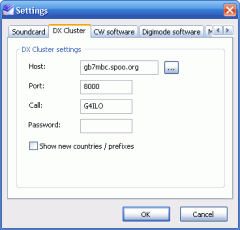 Host - this specifies the hostname (or address) of the DX Cluster server. If you don't know one, click the Browse (...)button on the right and select an entry from the list that is displayed.
- Port - this specifies the port number for the selected server. This will be filled in when selecting thehost using the browse button.
- Call - enter your call, which is normally used to log in to the DX Cluster server.
- Password - if the DX Cluster server requires a password, this must be specified.
- Show new countries/prefixes - if selected and a spot is for a new country or prefix, this will be displayed in the Comment field of the spot in place of the original comment (if any).
Next page: CW software
Previous page: Soundcard